
Tampa Bay's Premier Drone Club

FrSky R-XSR

This receiver comes pre-loaded with ACCESS firmware. Non-FrSky Radios and FrSky radios with older ACCST versions will be rendered unable to bind. Please flash your RX with the legacy firmware
Binding Steps (ACCST Mode):
-
Prepare Radio: Turn on the transmitter, navigate to the Model Setup menu, and select [BND] (Bind).
-
Power Receiver: While pressing and holding the F/S button on the R-XSR, connect the battery to power it on.
-
Confirm Bind: The green LED should light up solidly and the red LED will blink.
(LED Indicators: Solid Green = Bound, Blinking Red = In Bind Mode.)
-
Finalize: Release the button, disconnect the power, exit the bind menu on your radio, and reconnect power to the receiver.
Binding Steps (ACCESS Mode):
-
On your transmitter, go to the Model Setup menu and ensure the Internal RF mode is set to ACCESS.
-
Select the [Register] option on your radio screen.
-
Hold down the bind/failsafe button on the R-XSR receiver while plugging in the power.
-
The green and red LEDs on the receiver will flash, indicating it is in registration mode.
-
Once the radio displays the receiver's name/ID, select "Register" on the screen.
FrSKy XM/XM+
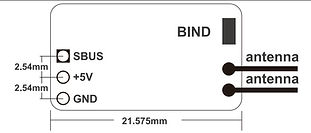
Binding Steps:
-
Turn on the transmitter while holding the F/S Button On the module.
-
Connect the battery to the XM+ Receiver while holding the F/S Button on the receiver. The LED should flash indicating the blinding process is completed.
-
Turn the transmitter and receiver off.
-
Turn on the transmitter and connect the battery. The GREEN LED on the reciever indivices the receiver is receiving commands from the transmitter.